User Management
This guide explains how Deepdesk manages users, controls access, and handles roles and permissions.
Deepdesk Roles
Role-based access control (RBAC) in Deepdesk assigns permissions to users based on their role within an organization. The following roles are available:
Agent
- Default role with no special permissions
- Standard user access to Deepdesk features
- Always external users created from existing platform users
Studio Editor
- Responsible for managing recommendation content
- Full access to:
- Text suggestions
- URL suggestions
- Style suggestions
Manager
- Same rights as Studio Editors, plus:
- User Requests management
- Users management
Assistant Editor
- Specialized role for managing assistant configurations
Note about agents vs. editors: Agents are always external users created from existing platform users. Editors in some cases are not platform users, meaning they can't use platform SSO. For these users, special accounts are created and they log in using Magic Links.
Automatic Role Assignment
For SSO logins, Deepdesk can automatically assign roles by mapping predefined role identifiers from the identity provider:
deepdesk.agent- Agent roledeepdesk.editor- Studio Editor roledeepdesk.manager- Manager roledeepdesk.assistant_editor- Assistant Editor role
This allows organizations to manage user roles centrally in their identity provider (e.g., Azure AD, Okta) and have those roles automatically reflected in Deepdesk.
For technical details about how role assignment works with OAuth2 and OIDC, see OAuth2 Roles.
Enabling Role-Based IAM
To enable automatic role assignment:
- Navigate to the account's
OAuthProviderrecord in the admin panel:/admin/authentication/oauthprovider/ - Enable the "Role based IAM" flag:
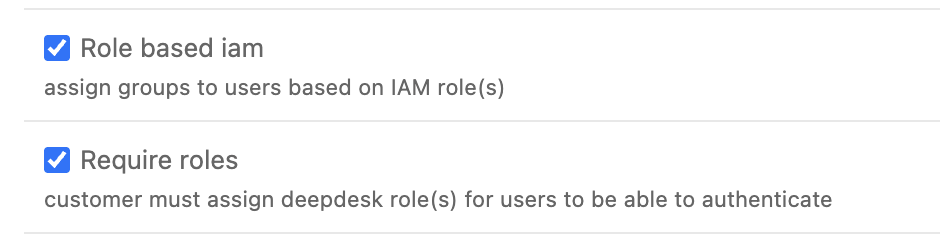
- Optionally, enable "Require roles" to restrict access to users without an assigned role
When "Require roles" is enabled, only users with a valid Deepdesk role can access the platform. This allows customers to control access by assigning appropriate roles in their identity provider.
Trial mode interaction: When "Role based IAM" is enabled, "Trial mode" is ignored, as customers can already control which users have access by assigning the right roles.
Platform Support
Automatic role assignment is currently supported for:
- Standard OAuth2 OIDC flows - Uses the
role_nameclaim in the ID token - Genesys Cloud OAuth2 flow - Custom implementation that reads roles from the Genesys Cloud API
For platform-specific configuration instructions, see:
Default Access Behavior
By default, any authenticated user can log in to Deepdesk. When a user successfully authenticates through SSO, Deepdesk automatically creates a new user account if one doesn't already exist. This streamlined approach allows verified platform users to access Deepdesk without additional approval steps.
Role-based access control: For more granular control over which users can access Deepdesk, see OAuth2 Roles for information about automatic role assignment through SSO.
Access Requests
For Magic Link authentication, when a user attempts to log in but doesn't exist in Deepdesk yet:
- An email is sent to the provided email address with a link to request access
- When the user opens the link, an access request is sent to the responsible manager
- If approved by the manager, a magic link email is sent to the user
- The user can then use the magic link to log in to Deepdesk
SSO exception: Access requests currently do not apply to SSO authentication. Authenticated SSO users are automatically created and logged in. To control SSO user access, use role-based access control.
Trial Mode
Trial mode provides additional control over user creation for accounts in trial:
Normal Operation (Trial Mode Disabled)
- Any authenticated user can log in to Deepdesk
- New users are automatically created once authenticated
- Applies to both SSO and Magic Link authentication
Trial Mode Enabled
- New users are not automatically created
- Users must be manually created in Studio before they can log in
- Once created, users can authenticate normally
- Exception: Magic Link authentication always requires approval for new users, regardless of trial mode
Role-based IAM interaction: When "Role based IAM" is enabled, "Trial mode" is ignored. Role-based access control provides a more robust way to manage user access by allowing customers to control which users have access through role assignments in their identity provider.
Inactive User Policy
Deepdesk automatically deactivates users who have not been active for a configurable period of time. This helps maintain security and ensures that only current, engaged users retain access to the platform.
- The inactivity period is set per account.
- To configure this, go to:
Account → Inactive user deactivation period days
- Users who have not logged in or been active within the specified number of days will be deactivated automatically.
- Deactivated users can be reactivated by an administrator if needed.
Configuration Options
For SSO Users
To control which SSO users can access Deepdesk:
- Enable Role-Based IAM: Configure automatic role assignment based on identity provider roles
- Require Roles: Only allow access to users with valid Deepdesk roles
- See OAuth2 Roles for configuration details
For Magic Link Users
- Access requests are always required for new users
- Managers must approve each access request
- Trial mode does not affect Magic Link authentication
For Trial Accounts
- Enable Trial Mode to require manual user creation
- Consider using Role-Based IAM for more flexible access control
- Note that Role-Based IAM supersedes Trial Mode when enabled